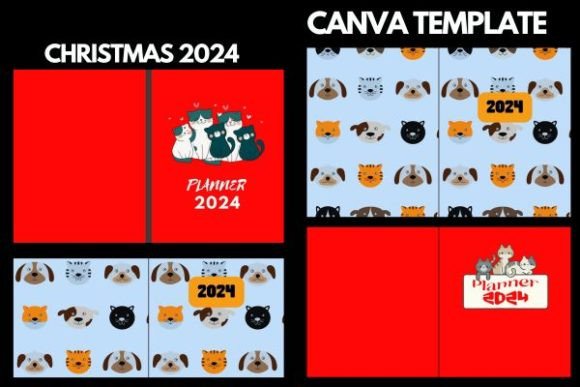
Agenda and Planner Book Covers for KDP: A Practical Guide for Low-Content Publishers
If you are creating low-content books for Amazon KDP, the cover is often the first factor that determines whether a shopper clicks or scrolls past. For planners, agendas, and journals, the cover does more than protect the pages—it communicates purpose, audience, and quality in a split second. Over the past few years, niche covers have become a reliable way to stand out, and designs for cat lovers are proving especially effective in 2024. This article walks through how to choose, customize, and use agenda and planner book covers that are ready to upload and easy to edit in Canva.
What Makes a KDP Agenda or Planner Cover Effective in 2024
A strong cover aligns with buyer expectations. When someone searches for a cat-themed planner, they want the cover to clearly signal that the interior matches their interest. The design should be clean, readable as a thumbnail, and appropriate for the size you are working with—in this case, 8.5x11 inches. That dimension is standard for many printed planners and leaves enough room for title text, imagery, and branding without feeling cluttered.
The covers discussed here come as ready-to-upload PDF files. You receive a finished layout that already meets Amazon KDP specifications for trim size, bleed, and resolution. But the real advantage is that each file can be edited easily in Canva. That means you are not locked into one look. You can swap colors, adjust fonts, replace background images, or add your own logo. This workflow saves hours of design time while still giving you control over the final product.
The Role of a Niche: Why Cat Lovers Work Well for Low-Content Books
Low-content publishing thrives on targeting specific interest groups. Cat enthusiasts are a large, engaged audience. They buy planners, daily journals, habit trackers, and gratitude logs specifically because the cover features their favorite animal. A well-designed cat cover can attract repeat buyers who collect different designs or buy them as gifts. The key is to avoid generic stock art. The designs in this collection are crafted to feel personal and contemporary, which helps your book appear more authentic in search results and on Amazon product pages.
When you pair a targeted cover with well-organized interior pages, your book has a higher chance of ranking for long-tail keywords like “cat lover daily planner” or “cat mom agenda 2024.” The cover becomes part of your overall SEO strategy because it influences click-through rates and, indirectly, sales velocity.
Where These Covers Fit in Your Publishing Workflow
Understanding the sequence of tasks helps you use these templates efficiently. Here is how the cover fits into a typical KDP planner creation process:
Before You Design the Interior
Start by choosing the cover style that matches the planner type you plan to create. If you are making a weekly agenda, select a cover that suggests an active or organized lifestyle. For a cat-themed product, that might mean a cover with a subtle cat pattern or a single elegant illustration. The PDF you receive includes placeholder text for the title and subtitle. Before you edit, decide what your interior will contain so the title is accurate. For example, if the interior is a simple undated weekly planner, label the cover “Weekly Cat Planner” rather than something vague like “Journal.” Accuracy builds trust and reduces returns.
During the Customization Phase
Open the PDF in Canva. The file is designed so that layers remain accessible if you upload it as a Canva template. You can change background colors, adjust the font style to match a certain mood, and resize elements as needed. The cover is already set to 8.5x11 inches with proper bleeds, so you do not need to worry about technical dimensions. Focus on the following edits to make the cover feel unique:
- Title typography: Use a bold, readable font for the main title. Make sure it contrasts with the background.
- Subtitle or tagline: Add a short line like “2024 Daily Planner” or “Your Year in Paws” to clarify the book’s purpose.
- Color palette: If the included colors do not match your brand, swap them. Cat-themed covers often work well with pastels, deep greens, or warm neutrals.
- Author name or logo: Place your name or brand mark on the back cover or spine. This helps with brand recognition over multiple titles.
After Customization
Once you finish editing, download the cover as a PDF (or PNG if you prefer) and upload it to KDP. The file is ready to use without further adjustments. You can then upload your interior PDF, set up the product description, and publish. Because the cover already includes the correct spine width for typical page counts, you may need to adjust if your interior has significantly more or fewer pages. Most of these covers are designed for a reasonable spine range, but always check the KDP preview before submitting.
Integration with Other Tools and Resources
The PDF covers work as a standalone resource, but they are even more effective when combined with a few other elements:
- Matching interior templates: Use a Canva interior template with similar design language. Consistent fonts and colors across cover and interior create a professional impression.
- Keyword research: Before writing your product description, research high-volume, low-competition keywords for cat planners. Use those keywords naturally in your description, but avoid stuffing them into the cover itself.
- Print-on-demand checklist: Keep a list of KDP specifications—bleed areas, minimum resolution, file type. Having those at hand speeds up the final upload.
Practical Implementation Tips for Long-Term Success
Getting the most out of these covers involves more than a one-time edit. Consider the following practices to build a sustainable low-content business:
Create a Series of Covers
If you produce multiple cat-themed planners, use the same base design but vary the color or the cat breed. A cohesive series encourages repeat buyers and helps Amazon’s algorithm link your books together through the “also bought” section. Each cover should still be distinct enough to appear separate in search results, but the family resemblance builds trust.
Test Different Title Styles
Sometimes a simple change in title wording increases clicks. For example, “Cat Lover’s Daily Planner” might perform differently than “Purrfectly Organized Planner.” Because the cover is editable in Canva, you can create two variations and use A/B split testing in KDP’s new features (where available). Track which version drives more preorders or sales in the first week and then stick with that approach for future releases.
Maintain Consistency Across Formats
These covers are designed for 8.5x11 inches, but you may also want a smaller version for pocket planners or a larger one for wall calendars. The same design principles apply. When you edit the main file, keep a copy and resize it for other formats rather than starting from scratch. Canva’s resize tool can handle this, but always check the bleed and margin adjustments afterward.
Factors to Consider for Smooth Integration
Several non-design factors influence how well a cover performs over the long term:
- File quality: The ready-to-upload PDF should be high resolution (300 DPI) and include the required bleed of 0.125 inches on all sides. Verify this before purchasing any cover template.
- Usage rights: Ensure the design elements—especially any cat illustrations—come with a commercial license. The covers described here are intended for commercial KDP use, but always confirm the terms.
- Update frequency: Planner covers that include a year (e.g., “2024”) have a natural shelf life. If you plan to reuse the design for 2025, design the title area so the year can be replaced easily without redesigning the entire cover.
A Typical Workflow from Template to Published Book
Here is a concrete sequence that new publishers can follow using these resources:
- Select a cat-themed cover PDF that matches the planner type (daily, weekly, monthly, or goal tracker).
- Open the file in Canva and duplicate it so you have a backup. Start editing the title, colors, and any decorative elements.
- Create matching interior pages in Canva or another tool using 8.5x11 inch dimensions. Keep the design simple but functional.
- Export both files as PDFs. The cover should be separate uploads for the front/back/spine combined.
- Set up a KDP book listing with keywords targeting cat owner niches. Write a description that mentions the cover design and interior features.
- Order a proof to check print quality and spine fit. Adjust the cover spine width if necessary.
- Publish and monitor the first 30 days for click-through rates. Consider slight title adjustments if clicks are low.
This workflow is repeatable across different cat designs and planner formats. Over time, you can build a catalog of ten, twenty, or more titles that each target a slightly different sub-niche—kittens, black cats, orange tabbies, or minimalist cat line art.
Observation on Quality Control and Usability
One of the biggest mistakes new KDP publishers make is publishing a cover that looks good on screen but prints poorly. Because these templates are already set up with proper resolution and bleed, that risk is minimized. Still, always check the KDP preview tool before finalizing. Look at the spine alignment and make sure no text is cut off. Usability also means that the cover should not interfere with the interior: the spine width should match the page count, the back cover should include a barcode area that does not overlap design elements, and the front cover title should be readable at thumbnail size.
Efficiency comes from repetition. Once you have customized one cat cover, the next one will take half the time. The template provides a consistent starting point, so your energy goes into differentiation through color, font, and imagery rather than technical setup.
Long-Term Use and Scalability
Low-content publishing is not a get-rich-quick scheme, but it can become a steady income stream with the right approach. Cover templates are a foundational asset because they remove the most time-consuming part of production. With a library of cat-themed covers that you can edit and repurpose, you can launch new planners quickly as trends shift. For example, in 2024, cat covers with floral elements or minimalist watercolor styles are gaining popularity. If you have a base design that is easy to modify, you can adapt to these trends without hiring a designer.
Additionally, consider building a companion set of matching notebooks or undated planners. A buyer who loves the cat theme might purchase the planner and then a matching journal. Having a family of covers ready helps cross-sell.
Final Thoughts on Integrating These Covers into Your Business
Agenda and planner book covers for KDP are more than decoration. They are a tactical tool that directly affects discoverability, trust, and sales. By using ready-to-upload PDFs that you can edit in Canva, you save time while retaining full creative control. For cat lovers, the designs tap into an enthusiastic community that actively seeks personalized organization tools. Whether you are a first-time self-publisher or an experienced creator scaling your catalog, these covers provide a solid foundation for a productive 2024.
Invest a few minutes to customize the title, colors, and details, then move on to building the interior. Each book you launch becomes an opportunity to refine your process. Over time, the combination of strong covers and well-structured interiors creates a library that attracts buyers and reduces the friction of starting each new project from scratch.