2024 Affirmation Journal Editable: A Practical Workflow Tool for Your KDP Low-Content Publishing Business
Building a sustainable low-content or no-content book publishing business on Amazon KDP requires more than just uploading files. It demands a repeatable process, consistent quality, and assets that adapt to different niches without requiring a redesign each time. The 2024 Affirmation Journal Editable delivers this flexibility through a structured yet customizable template that supports both speed and precision. If you have been testing the waters with journal interiors or want to expand your catalog efficiently, understanding how to integrate this resource into your actual workflow makes the difference between a product that sits dormant and one that converts reliably.
What the 2024 Affirmation Journal Editable Actually Provides
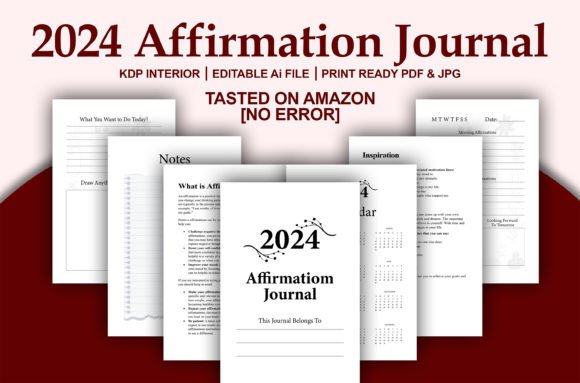
This is not a single fixed design. The 2024 Affirmation Journal Editable includes 121 pages organized across 7 distinct page layouts. At 6 x 9 inches, the trim size is a standard KDP favorite, proven for journals, notebooks, and guided diaries. The file arrives as an Adobe Illustrator editable PDF, meaning you can open it in Illustrator, change colors, adjust typography, replace imagery, or resize elements. Because the design is vector-based, scaling is clean and sharp even if you later decide to test other trim sizes beyond 6 x 9. The no-bleed specification means you can upload directly to KDP without worrying about margin issues, and the file has been tested on Amazon KDP with no errors. In practical terms, this saves you the first round of troubleshooting that often eats hours on a new interior.
Where This Fits in a Publishing Workflow
When you are building a KDP catalog around low-content books, the interior creation step is frequently the bottleneck. You need a layout that feels intentional, not generic, but you also need it fast. The 2024 Affirmation Journal Editable sits in the middle of that process, after niche research and before cover design. Once you identify a market, such as daily affirmations for career growth, self-esteem, or mindfulness, you can open the editable PDF, populate the 7 page types with your affirmation prompts or phrasing, and proceed directly to cover creation. Because the interior is already print-ready, your quality control step becomes a rapid review rather than a full layout build.
This workflow matters most when you plan to release multiple affirmation journals across different themes. Instead of building a new interior from scratch for each variation, you treat this template as your base layer. Modify colors and accent elements to match each niche, adjust wording to fit the audience, and export. Over a quarter, that efficiency compounds into more titles with fewer production hours per unit.
Before You Start: Preparation That Saves Time Later
Before opening the file, confirm that you have access to Adobe Illustrator. The editable PDF is designed for Illustrator, and while some PDF editors may allow minor text changes, full access to layers, colors, and vector elements requires Illustrator. If you do not currently use it, consider the workflow investment: learning to adjust fills, strokes, and text boxes in Illustrator unlocks the ability to modify not just this journal but any vector-based interior you acquire in the future.
Decide your affirmation category in advance. Having a list of 120 to 130 affirmations ready before you open the template lets you move through the 7 page types in one session rather than piecemeal. The journal contains 121 pages, so matching your content quantity to the available space eliminates guesswork. Also, choose a color palette that aligns with your target audience. Affirmation journals aimed at professionals might use muted blues and grays. Journals for creative entrepreneurs can incorporate warmer tones or pastels. Because the file is vector, changing a global color swatch takes seconds, but only if you plan the palette beforehand.
Working Through the 7 Page Types
The 7 different page designs provide variety within the journal without making it feel disjointed. Some pages likely include space for a daily affirmation, others for reflection, weekly intentions, or gratitude prompts. When you edit the file, pay attention to how the pages flow sequentially. Readers experience rhythm as they move through a journal. If every page looks identical, engagement drops. The variety in this template gives you that rhythm automatically, and your job is to ensure the content matches the page type. For example, a page with a large header and minimal writing space probably works best for a single powerful affirmation. A page with multiple prompts suits a more guided daily entry.
As you work through each page layout, keep consistency in font choices. Use one display font for headers and one clean sans-serif or serif for body text across all 7 types. This preserves visual coherence even as the layout shifts. The vector PDF allows you to define these styles once and apply them across pages, which speeds the editing process considerably.
Resizing for Different Trim Sizes
One practical advantage of the vector-based file is the ability to scale. While the template ships at 6 x 9 inches, you may want to test 5.5 x 8.5 or 7.5 x 9.25 for specific niches. In Illustrator, select all elements and scale proportionally, then check that margins and text boxes remain within the new trim boundaries. Because there is no bleed requirement, you only need to ensure that content stays within the safe zone for your chosen size. This makes the same interior usable for multiple product variations, allowing you to publish the same affirmation content in different formats without rebuilding.
If you are new to scaling, create a duplicate of the file before resizing. Keep the original 6 x 9 version as your master reference. Then resize the copy, verify page numbers, and export as a new PDF. Label each version clearly in your asset folder. Over time, you will accumulate a library of sized variants ready for rapid upload.
Interaction with Other Tools and Assets
The 2024 Affirmation Journal Editable does not exist in isolation. Combine it with a cover design tool such as Canva or Adobe InDesign for the outer jacket. Use KDP's paperback cover calculator to ensure spine width matches your page count. Because the interior has 121 pages, your spine will be relatively thin, approximately 0.25 to 0.3 inches, depending on paper type. Factor this into your cover design so text and graphics align correctly.
For categorization and description writing, the 7 page types give you concrete features to list in your product description. Mentioning that the journal includes multiple page variations, not a repetitive single layout, adds credibility and signals value to potential buyers. Update your backend keywords to reflect the specific affirmation niche you target with each release.
Quality Control Steps Before Upload
Even when a file is marked as tested on KDP with no errors, you should run your own quality check after editing. Export the PDF from Illustrator using the press quality preset. Open the PDF and page through every page to confirm that text is legible, no elements are cut off, and page numbers appear correctly. Because you modified the content, you are responsible for the edited version. Also, check that your affirmation text fits within the designated text boxes without overflowing. A single truncated sentence reduces the reader's experience and can lead to returns or negative reviews.
Run KDP's preview tool after uploading. Scroll through the entire book in the previewer to catch any rendering issues specific to Amazon's system. Even though the file has been tested, each edit changes the document, and preview catches issues that your local PDF viewer might miss.
Organizing for Long-Term Use
Once you have your first edition live, save the working Illustrator file with your edits intact. Name it clearly, for example, "2024 Affirmation Journal - Career Focus - Final.ai". Store it in a structured folder hierarchy: Master Templates > Affirmation Journals > Editable Files. If you later want to create a new version for a different theme, open the master template again rather than editing a previously modified version. This keeps your base design clean and avoids accidentally carrying over niche-specific styling from an earlier project.
Consider building a simple spreadsheet tracking which version you released, which trim size, which color palette, and which set of affirmations you used. Over months, this becomes a catalog map that helps you spot gaps or opportunities for rerunning a successful theme in a new size.
Practical Observations on Page Count and Market Fit
The 121-page count positions this journal in a sweet spot for affirmation books. Books under 100 pages can feel thin to buyers who perceive value in heft. Books over 200 pages increase production cost and may intimidate users who want a low-commitment daily practice. At 121 pages, the journal offers roughly four months of daily use if each page covers one day, or longer if some pages span multiple days. This length supports pricing in the $6.99 to $9.99 range on KDP while maintaining reasonable royalty margins, especially if you select a 6 x 9 trim with standard black and white interior printing.
The 7 page types also affect market perception. A journal with only one repetitive page template appears generic. The variety here signals that the book was designed intentionally. When writing your product description, call out the specific page types and how they guide the user through different reflection modes. This turns a feature into a benefit and differentiates your listing from competitors using simpler interiors.
Integrating into a Broader Publishing Routine
If you are running multiple low-content book series, treat the 2024 Affirmation Journal Editable as one of several template categories in your workflow. Pair it with a gratitude journal template, a habit tracker, or a planner template to create a cohesive brand suite. Use consistent fonts and color formulas across all templates so that customers who buy one book recognize the design language in your other titles. This cross-recognition encourages repeat purchases and builds trust in your catalog.
From a scheduling perspective, block out two to three hours for the initial customization of the template. During that session, edit all 7 page types, populate your affirmations, set colors, and export. After that, a new variation for a different niche might only require 45 minutes to an hour, covering text replacement and minor color tweaks. This efficiency lets you batch produce titles on a weekly cadence without sacrificing quality.
For publishers who collaborate with virtual assistants or freelancers, the editable PDF in Illustrator format provides a sharable asset. You can give clear instructions on which colors to change, which text to replace, and how to export. Because the file is structured, you reduce the risk of your assistant introducing layout errors. This scalability makes the template valuable not only as a one-time interior but as part of a repeatable content operation.
If this approach aligns with your publishing goals, explore other templates that follow the same structure. Consistency across your tools leads to consistent output, and that consistency is what turns a side project into a sustainable revenue stream.